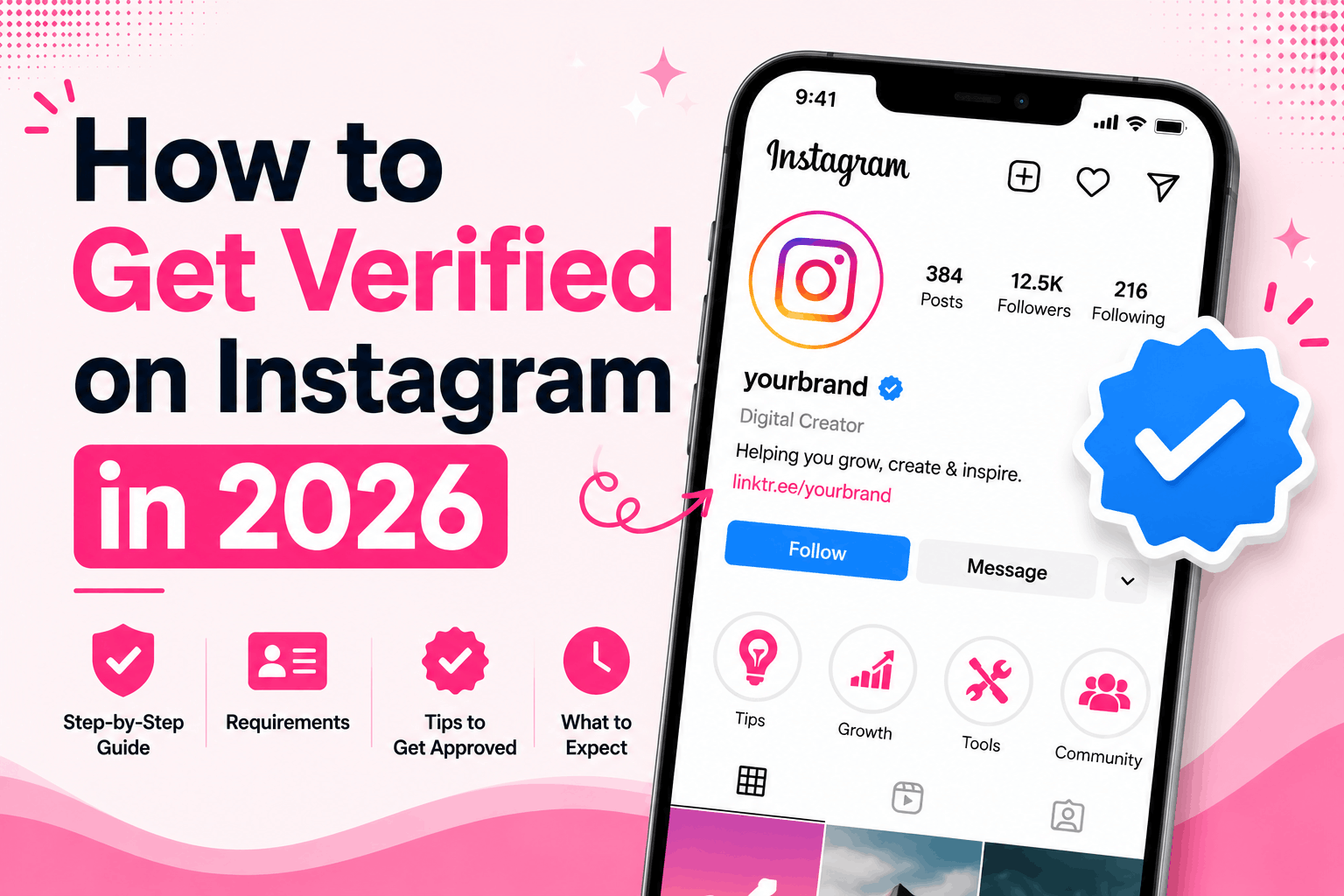

In 2026, there are two ways to get verified on Instagram: apply for the free blue badge as a notable public figure, or subscribe to Meta Verified starting at $11.99/month. Both give you the same blue checkmark, but they work very differently, and knowing which path fits your situation will save you a lot of wasted effort.
Instagram has almost 3 billion users. That is a lot of noise. The blue checkmark cuts through it instantly — it signals your account is real, your brand is legitimate, and you are who you say you are. For creators and businesses, that one small icon carries serious weight.
Key Takeaways
- • Two verification paths exist in 2026: the free badge (for notable public figures) and Meta Verified (a paid subscription open to almost anyone).
- • Meta Verified costs $11.99/month on the web or $14.99/month in-app for individual creators.
- • The free badge is merit-based — Instagram evaluates authenticity, uniqueness, completeness, and notability. There is no minimum follower count.
- • Meta Verified approval takes under 48 hours. Free badge applications can take up to 30 days.
- • The two badges look identical — there is no visual difference on your profile between the paid and free checkmark.
What Does Instagram Verification Actually Mean?
Instagram verification is the process of confirming that an account is the authentic presence of a real person, public figure, or registered business, shown by the blue checkmark badge next to your profile name.
In 2026, that badge means something slightly different depending on how it was earned. The traditional free badge means Instagram independently confirmed you are a notable, highly-searched public figure or brand. Meta Verified simply confirms your identity matches a government ID. It does not confirm you are notable or well-known. Both badges look identical on your profile.
I tested the Meta Verified process earlier this year. The identity check is now tighter than it was at launch. You submit a government ID, and in some cases a selfie or short video for biometric matching. The badge appeared on my account about 20 minutes after payment cleared. Surprisingly fast, honestly.
One thing worth understanding upfront: Instagram verification (blue check) is not a growth tool. It is an identity and trust signal. If you go in expecting follower spikes, you will be disappointed. If you go in wanting legitimacy and protection, it delivers.
The Two Ways to Get Verified on Instagram in 2026
Here are two methods to get verified on Instagram in 2026:
Method 1: Apply for the Free Blue Badge (Notable Figures)
This is the traditional route. It costs nothing, but it is genuinely hard to get approved.
Instagram awards the free badge to accounts that meet four specific criteria. You need to pass all four, not just most of them.
| Criteria | What Instagram Looks For |
| Authentic | Real person, public figure, or registered business. Government ID or business documents required. |
| Unique | One verified account per person or brand. No fan pages, parody accounts, or duplicates. |
| Complete | Public profile, profile photo, bio, and at least one post. Private accounts cannot be verified. |
| Notable | Well-known and highly searched. Press coverage in credible outlets, Wikipedia presence, or significant cross-platform following. |
Notability is the requirement that blocks most applicants. Instagram defines it as being “well-known and highly searched for,” which in practice means third-party press coverage from reputable, non-paid outlets. A Wikipedia page, Google Knowledge Panel, or verified presence on other major platforms all strengthen your case.
Also worth noting: Instagram looks at whether people are actively searching for you. Not just whether you have followers. That distinction matters more than most guides let on.
One important reality check: As of late 2025, the notability bar has gotten noticeably stricter. Accounts with 30,000+ followers, international press coverage, and verification on other platforms have reported repeated rejections over five or more months. The process is more discretionary than it used to be. (Source:Elfsight)
So if you get denied despite having real credentials…that happens! It is not always a reflection of whether you “deserve” it.
Method 2: Subscribe to Meta Verified (Anyone Can Apply)
Meta Verified removes the notability requirement entirely. You pay a monthly fee, submit a government ID, and get the blue checkmark plus a set of account benefits.
Meta Verified pricing in 2026:
| Plan | Web Price (Monthly) | In-App Price (Monthly) |
| Individual (Standard) | $11.99 | $14.99 |
| Business (Standard) | $14.99 | Higher |
| Business Plus | $49.99 | Higher |
| Business Premium | $149.99 | Higher |
| Business Max | $349.99 | Higher |
(Source:Meta)
Always subscribe through the web if you can. The in-app price is higher because Apple and Google charge Meta a commission fee, which gets passed straight to you.
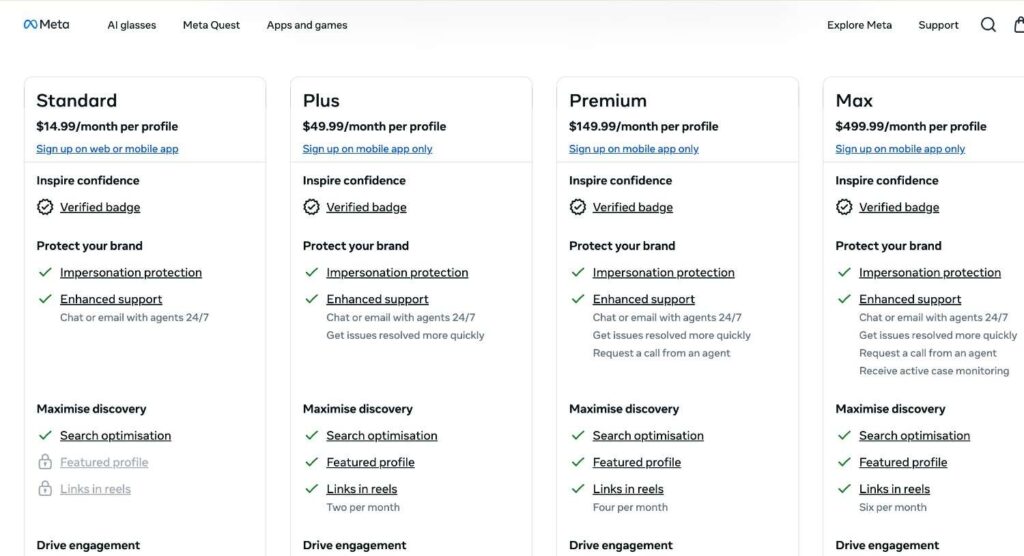
What Meta Verified includes:
- Blue verification badge on your Instagram profile
- Impersonation monitoring — Meta proactively watches for fake accounts using your name or likeness
- Account support — access to human support agents, not just automated help flows
- Exclusive stickers for Stories and Reels
- Early access to new Instagram features before general rollout
The impersonation monitoring is the most underrated benefit here. If you run a business and someone has already tried to clone your account, this alone is worth the monthly cost.
How to Apply for the Free Instagram Verification Badge
These steps apply to the traditional free badge for public figures, creators, and businesses pursuing the merit-based route.
Before you apply, make sure your account checks these boxes:
- Your account is public
- You have a profile photo, a bio, and at least one post
- Your account follows Instagram’s Terms of Use and Community Guidelines
- You have not made excessive recent changes to your username or profile photo
Step-by-step:
- Open the Instagram app and tap your profile icon in the bottom right.
- Tap the three-line menu icon in the top right corner.
- Go to Settings and privacy.
- Scroll to Account type and tools, then tap Request Verification.
- Enter your full legal name — this must match your government ID exactly.
- Upload a government-issued photo ID (individuals) or official business registration documents (brands).
- Select your account category from the dropdown.
- Add supporting links — press coverage, your official website, verified profiles on other platforms, Wikipedia page if you have one. Do not skip this step.
- Submit your application.
Instagram reviews applications internally and notifies you through the app.
Timeline: Up to 30 days, though some accounts hear back much sooner. If denied, you can reapply after 30 days. Use that time to build more press coverage before going again.
How to Sign Up for Meta Verified on Instagram
This is the faster, more accessible path and the one most creators and small business owners will realistically use.
Eligibility requirements for Meta Blue Tick:
- You must be 18 or older
- Your profile must be complete — profile photo, full name, some posting activity
- Your name on Instagram must match your government-issued ID
- Two-factor authentication must be enabled
- Your profile photo must show your face (individual accounts)
Step-by-step:
- Open the Instagram app and go to your profile.
- Tap the three-line menu, then Settings and privacy.
- Tap Meta Verified.
- Select the account you want to verify.
- Choose your subscription plan.
- Pay, but consider going to meta.com/meta-verified on a browser first to get the $11.99 web rate instead of $14.99 in-app.
- Submit your government-issued ID when prompted.
- Wait for identity confirmation. Usually under 48 hours — often much faster.
Once approved, your checkmark appears immediately and all Meta Verified perks activate on your account. If you are also running a Facebook page for the same brand, Meta offers a bundle discount when you verify both together.
If you manage your brand across multiple platforms, you may also want to read our breakdown of what YouTube monetization is and how it works, understanding how different platforms handle creator credibility and income is useful context when you are building a presence from scratch.
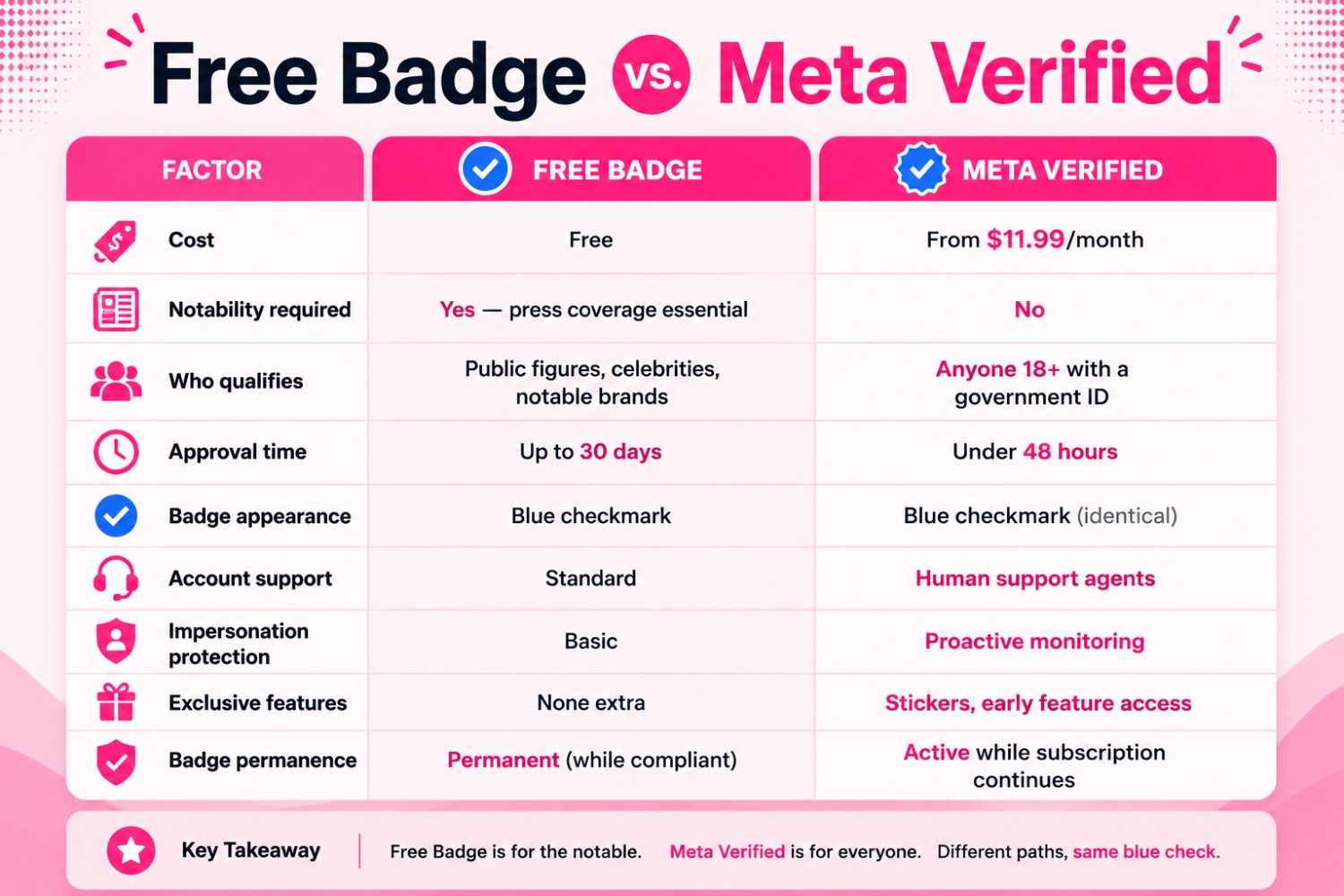
Free Badge vs. Meta Verified: Which One Is Right for You?
| Factor | Free Badge | Meta Verified |
| Cost | Free | From $11.99/month |
| Notability required | Yes — press coverage essential | No |
| Who qualifies | Public figures, celebrities, notable brands | Anyone 18+ with a government ID |
| Approval time | Up to 30 days | Under 48 hours |
| Badge appearance | Blue checkmark | Blue checkmark (identical) |
| Account support | Standard | Human support agents |
| Impersonation protection | Basic | Proactive monitoring |
| Exclusive features | None extra | Stickers, early feature access |
| Badge permanence | Permanent (while compliant) | Active while subscription continues |
Honestly? For most people reading this, Meta Verified is the realistic path. The free badge is genuinely hard to get and getting harder. If you are an emerging creator or small business owner, $11.99/month for the legitimacy signal plus protection is a reasonable investment — not a status play.
If you do have real press coverage and a recognized public profile, apply for the free badge first. It carries more weight because it cannot be purchased.
How to Increase Your Chances of Getting the Free Badge
If you are working toward the merit-based route, these steps genuinely move the needle.
- Get covered by credible press. Features, interviews, and mentions in news outlets, trade publications, and industry blogs all count. Paid placements and sponsored articles do not — Instagram explicitly excludes these.
- Build a Wikipedia page. A Wikipedia article about you or your brand is one of the strongest notability signals Instagram recognizes. It is also one of the harder ones to earn legitimately, which is exactly why it carries weight.
- Earn a Google Knowledge Panel. If Google recognizes you as a notable entity and generates a Knowledge Panel, that sends the same signal to Instagram’s reviewers.
- Get verified on other platforms. A checkmark on X (Twitter) or LinkedIn does not guarantee Instagram approval, but it builds your overall notability case.
- Fill out your supporting links properly. Do not leave that field blank. Add your best press mentions, your official website, and any verified profiles elsewhere.
- Build notability first, then apply. Most creators who eventually get approved spent 3 to 6 months building press coverage before reapplying after an initial rejection.
Speaking of building a public presence, the green dot on Instagram is one of those small features that affects how people perceive your activity and availability on the platform. If you have not thought about that, our guide on what the green dot means on Instagram is worth a quick read alongside your verification prep.
Limitations and Honest Caveats
A lot of verification guides skip this section. We are not going to.
1) The blue checkmark does not boost your reach.
Instagram has not confirmed any algorithmic benefit. Some Meta Verified users report slightly better visibility in search — others see nothing change. Do not pay $11.99/month expecting follower growth.
2) The free badge process is opaque and somewhat arbitrary.
Even strong applicants with large followings, international press, and multi-platform verification get rejected, sometimes repeatedly. Instagram does not publish exact approval criteria. If you get denied despite solid credentials, there is no real appeal mechanism. Wait 30 days. Apply again with more.
3) Meta Verified verifies you — not the platform.
Bots and fake accounts can still interact with your verified profile freely. Your badge confirms your identity. It does not clean up Instagram’s bot problem. That is a meaningful distinction.
4) You can lose your badge.
Switching account types, violating Instagram’s policies, changing your username repeatedly, or canceling your Meta Verified subscription can all cost you the checkmark. Keep your profile consistent with what you submitted.
5) Meta Verified is not available everywhere yet.
It is currently live in the US, UK, Canada, Australia, New Zealand, and expanding. If you are outside these regions, you may land on a waitlist.
6) Watch out for scams.
Instagram will never DM you offering verification. No third party can sell you a legitimate badge. If someone offers to get you verified for a fee, it is a scam — full stop. The only two real paths are Instagram’s in-app request form and the official Meta Verified subscription.
Final Thoughts
Getting verified on Instagram in 2026 is more accessible than it has ever been, but the checkmark means something different now depending on how you got it.
If you have genuine press coverage and a recognized public profile, pursue the free badge. It is harder, slower, and less predictable, but it cannot be bought, which is precisely why it still carries more weight.
If you are an emerging creator or small business owner who wants the legitimacy and protection benefits now, Meta Verified is a solid, practical option at $11.99/month. The badge looks the same, the impersonation monitoring is real, and the human support access is a meaningful upgrade over Instagram’s standard help system.
What verification will not do is fix your content strategy. The checkmark gets you taken more seriously, but what people find when they actually visit your profile is still entirely on you. If you are building out your presence across platforms, our article on how to turn off YouTube Shorts is a good example of the kind of small platform settings that add up when you are managing multiple channels at once.
Start there. Get the basics right. The blue checkmark will follow.
Frequently Asked Questions
The free badge costs nothing, but you need to be a notable public figure and meet Instagram’s criteria. Meta Verified starts at $11.99/month on the web or $14.99/month through the app. Business plans scale higher depending on features and account count.
Anyone 18 or older can subscribe to Meta Verified and receive the blue checkmark, as long as they have a government ID and meet the basic profile requirements. The free traditional badge is reserved for public figures, celebrities, and notable brands — most regular accounts will not qualify for this route.
Instagram has not confirmed any algorithmic reach benefit tied to verification. The main practical benefits are credibility, impersonation protection, and (with Meta Verified) access to human support. It is not a growth tool.
You can reapply after 30 days. Use that time to build additional press coverage, strengthen your supporting links, and make sure your profile is fully complete. Do not resubmit the same application without making changes.
The free badge application takes up to 30 days. Meta Verified typically activates within 48 hours of payment and identity confirmation, sometimes in under an hour.
No. Instagram does not list a minimum follower count for the free badge. Notability is about public interest and press coverage, not follower numbers. A larger following can support your application indirectly, but it is not the deciding factor.
It depends on your situation. If your account has been impersonated, if you need human support access, or if you want a credibility signal for a business, $11.99/month is reasonable. If you are just starting out and none of those issues apply yet, it is not urgent.
Yes. The free badge can be revoked for policy violations, account type changes, or repeatedly altering your username or profile photo. You lose Meta Verified if you cancel the subscription, miss a payment, or move to a region where it is unavailable.
No. Both show the same blue checkmark next to your name. There is no label indicating which path you took to earn it.